


Request A Quote
- Availability:
- 5-7 Business Day

Purchase Protection
Every Order is Protected By BuySafe
Our commitment to sustainability ensures that every purchase supports responsible operations and a healthier planet.
SSL Secure Payment
We make sure your orders are processed as quickly as possible - stocked products are shipped next business day - Vendor direct ship products are processed directly with vendors with vendor leadtime.
Express Shipping
Price Match Guarantee

Your payment is secure
Your privacy and security are our top priority. Our advanced encrypted payment system protects your information during every transaction.

Get expert help
Our team of experienced professionals is always ready to help.
Product Details
NetApp SnapManager for SharePoint software enables you to monitor and manage your growing Microsoft SharePoint Server environment across your entire enterprise. Using the clustered Data ONTAP operating system you can perform routine maintenance and upgrades without disrupting storage operations. Our deep integration with AvePoint DocAve software lets you deploy an integrated platform that supports end-to-end SharePoint storage management monitoring and deployment of governance policies.
SnapManager software enables automatic placement of files and BLOBs on SMB (CIFS) shares outside of the content database to improve the scalability of large SharePoint deployments.
Back up SharePoint Server data in minutes and recover at any granularity from individual documents up to an entire SharePoint farm within minutes from local or remote backups. SnapManager automates backup and restore of Nintex workflows and FAST search information and certificates.
SnapManager and SnapMirror software together can simplify remote replication of SharePoint data enabling a reliable disaster-recovery strategy.
Key Benefits
- Reduce Operational Costs
Leverage our centralized data management capabilities to simplify and optimize SharePoint data storage according to business requirements. - Optimize Business Continuity and Disaster Recovery
Perform storage maintenance hardware lifecycle operations and software upgrades without interrupting your business. Perform granular restore and clone restore for test/development scenarios or recover your entire SharePoint environment in minutes versus hours or days. - Increase Productivity
Streamline data management and automate routine tasks so administrators can spend less time performing maintenance and more time on highvalue/ROI tasks.
Support rapidly growing SharePoint environments while managing IT resources efficiently
The scope scale and complexity of today&rsquos data-driven world create new demands for agility in the data center. As Microsoft SharePoint Server adoption has increased so has the complexity of many SharePoint deployments. SharePoint is now considered a platform delivering business-critical services to organizations using web portals and extranets enterprise content management workflow search and enterprise social networking.
In many SharePoint environments storage efficiency and scalability can be significant issues. Scaling users and storage in addition to changing or upgrading hardware or software can interrupt business operations reducing the availability of critical SharePoint data. Managing and protecting SharePoint data can also be time consuming and complex significantly increasing administration overhead. For IT managers and SharePoint administrators this development poses a number of challenges:
- Cost-effectively meeting SLAs based on increasing business requirements
- Managing storage and performance for rapidly growing SharePoint Server farms
- Seamlessly scaling SharePoint deployments to manage large data files and more users
- Protecting SharePoint data efficiently
- Meeting archive compliance and governance requirements
To address these challenges you need an approach that focuses on storing and managing your SharePoint data more efficiently and economically while increasing the availability of your enterprise collaboration environment. You also need an agile storage infrastructure that can readily and cost effectively scale to keep pace with the evolving needs of your business.
NetApp SnapManager for Microsoft SharePoint
With NetApp SnapManager for SharePoint (SMSP) you get a powerful combination of manageability efficiency data protection and scalability for various workloads within the SharePoint platform including collaboration portals document repositories workflows and Internet sites based on Microsoft SharePoint Server. SnapManager enables you to externalize and store unstructured binary large objects (BLOBs) on NetApp Server Message Block (SMB) shares also known as Common Internet File System (CIFS) storage outside of SQL Server thereby reducing SQL database size.
Our storage solutions allow your IT staff to monitor the health of and manage SharePoint Server 2010 and 2013 farms across the enterprise from a centralized location. With NetApp you can easily provision additional storage as needed without affecting your SharePoint users. Our integrated solutions also help you to automate data protection including data backup leveraging NetApp Snapshot technology and replication for disaster recovery purposes using NetApp SnapMirror technology.
Tight integration of SnapManager Storage Manager&rsquos Remote BLOB Storage Provider with Microsoft technologies means increased scalability of your SharePoint environment by storing and managing BLOB data on NetApp SMB (CIFS) shares outside the Microsoft SQL Server database.
Reduce storage costs
When you consolidate SharePoint Server data onto NetApp storage you save money by improving storage utilization and simplifying data management. With NetApp SnapManager for SharePoint Server you can:
- Save money through space-efficient storage and deduplication of redundant SharePoint data.
- Streamline data and storage management of SharePoint Server farms across your enterprise.
- Increase IT productivity by automating various data management and protection functions.
- Optimize your resources through a tiered storage strategy supported by the NetApp Unified Storage Architecture that enables SMB-based data on NAS and SAN data to reside on a single NetApp storage system.
- Reduce costs by externalizing BLOB files from expensive primary storage to NetApp SMB/CIFS shares using SnapManager for SharePoint Storage Manager.
- Archive SharePoint data to less expensive SATA storage for comprehensive hierarchical storage management using SnapManager for SharePoint Archive Manager.
- Utilize another key capability Connector to access and manage unstructured SMB/CIFS file share data through SharePoint without having to import the data into SharePoint content databases.
Through policy-based data management SnapManager enables you to externalize BLOBs based on preconfigured rules onto SMB shares that use lower-cost SATA storage. With Storage Manager you have the flexibility to move files by group site collection file type size or access time in real time when users upload files or on a schedule to NetApp SMB/CIFS shares.
To further reduce costs and increase efficiency our SharePoint storage solutions support virtualized IT environments including Microsoft Windows Server with Hyper-V and VMware vSphere as well as private cloud implementations to shrink your overall physical infrastructure footprint and provide integrated management automation and self-provisioning capability.
Scale seamlessly
The combination of SnapManager for SharePoint and the clustered Data ONTAP operating system NetApp&rsquos leading storage operating system means that as business requirements change your SharePoint infrastructure is agile and can be adjusted dynamically and seamlessly. Improve service levels by redeploying or adding SharePoint workloads without interrupting business. SnapManager support for clustered Data ONTAP enables nondisruptive operations during your infrastructure maintenance and upgrades with seamless cluster failover capabilities in the storage subsystem.
With clustered Data ONTAP you will not experience data outages during storage system maintenance upgrades resizing of FlexVol volumes load rebalancing or even volume movement within a virtual server. Maintain access to all of your data for the duration of its life. Clustered Data ONTAP offers a highly flexible infrastructure that can readily support changing business requirements with optimized resource utilization which in turn can help you reduce infrastructure costs.
Using Storage Manager you can easily move and store large unstructured data files outside of the SQL Server database using External BLOB Storage or Remote BLOB Storage in real time or on a schedule. These large unstructured data files are stored on less expensive SATA disk&ndashbased SMB shares on NetApp storage system. As a result you can store and manage large data files more efficiently while achieving seamless scaling of your SharePoint environment. The less expensive SMB shares can also help you to lower the overall cost of your SharePoint storage.
Improve manageability
You can easily connect existing file shares with SharePoint using the Connector module which enables users to manage connected data using SharePoint. With Archive Manager you can complete the data management cycle by automatically retiring data from SharePoint after it reaches specified archive parameters.
The automated discovery feature of SnapManager for SharePoint enables you to easily set up monitor and manage the growth of SharePoint Server farms across your enterprise. And with the Health Analyzer you can easily scan individual SharePoint servers or entire farms to check the overall configuration including software prerequisite checks network access management and Windows Server settings. NetApp provides an agile storage infrastructure that enables you to quickly provision additional storage resources without affecting SharePoint users. Further with built-in role-based access controls you can easily manage the administration of multiple users with multiple roles through the SnapManager management console. With NetApp you have the flexibility and automation needed to intelligently manage your SharePoint data.
SnapManager is tightly integrated with the AvePoint DocAve platform which extends the management capabilities of our comprehensive SharePoint solution. A highly intuitive graphical user interface enables centralized policy-based management of multiple SharePoint farms and automates routine data management tasks such as backup recovery and moving data to SMB storage. You can develop custom scripts with an SMSP library of Windows PowerShell&trade cmdlets and AvePoint DocAve SDKs to provide application extensibility and further enhance manageability.
Safeguard SharePoint data
Eliminate exposure to data loss by performing frequent and automated backups with our fast Snapshot technology. SnapManager takes only seconds to minutes to perform complete farm- and item-level backups while significantly minimizing the required disk space. This dramatically reduces backup window times and enables you to make more frequent and complete backups. Up to 255 Snapshot copies per volume can be kept online at any one time with negligible performance impact. With SnapManager for SharePoint FAST content SSA FAST search server farms and FAST certificates can be automatically backed up and restored.
With SnapManager you can achieve nondisruptive operations as you plan and implement a highly reliable disaster recovery strategy for your SharePoint Server data. By adding NetApp SnapMirror replication technology you can simplify remote replication of SharePoint Server data so that it can be recovered rapidly in the event of a disaster.
With support for multi-tenancy customers can utilize functionality that Data ONTAP offers to provide data compartmentalization for all tenants with each granted access only to its designated storage container. Rich support based on Windows PowerShell for both Data ONTAP and NetApp integrated backup empowers administrators to develop appropriate workflows that support the needs of your multi-tenant environment. In addition clustered Data ONTAP provides storage quality of service (QoS) workload management using policies that specify a throughput limit defined in terms of IOPS or MB/sec. This optimizes SharePoint Server performance consistently without being affected by other application workloads or tenants.
Achieve fast granular recovery of SharePoint Server data
With SnapManager you can recover SharePoint Server data in minutes not hours or days benefiting from one of the fastest backup and recovery solutions available. SnapManager also gives you the flexibility to recover and restore an entire SharePoint farm site collection sites subsites individual documents and document versions as needed&mdash all within minutes. You can also choose to restore to an alternate SharePoint farm. In addition Nintex NewsGator and KnowledgeLake workflows are protected.
Meet archive and compliance requirements
Our archive and compliance solutions help you further reduce storage costs with the use of low-cost disk-based long-term storage. You can archive data to SnapLock devices for compliance while lowering SharePoint storage expense for primary storage. We also offer encryption solutions that help reduce the risk of inadvertent or malicious alteration of your SharePoint Server data in both the database and remote BLOB storage. With the addition of SnapVault software you can store weeks months or even years of backups on less expensive secondary storage while substantially reducing disk capacity requirements. The Archive Manager can also archive data from SharePoint sites using a policy-based engine for long-term storage on less expensive secondary NetApp storage devices.
Extend your solution with AvePoint DocAve integration
You can combine the power of the DocAve software platform with NetApp storage and data management for an integrated platform that supports endto-end SharePoint storage management monitoring and deployment of governance policies. This integrated platform enables you to:
- Perform end-to-end management of global SharePoint deployments with simplified deployment monitoring and enforcement of Microsoft SharePoint 2010 and 2013 governance policies.
- Manage development test and production farm administration with ease and govern solution deployment with DocAve application lifecycle management tools.
- Obtain comprehensive real-time intelligence about your SharePoint environment including operations performance and content usage.
- Simplify your content migration from multiple legacy systems to SharePoint Server.
- Enforce security compliance and retention for business content.
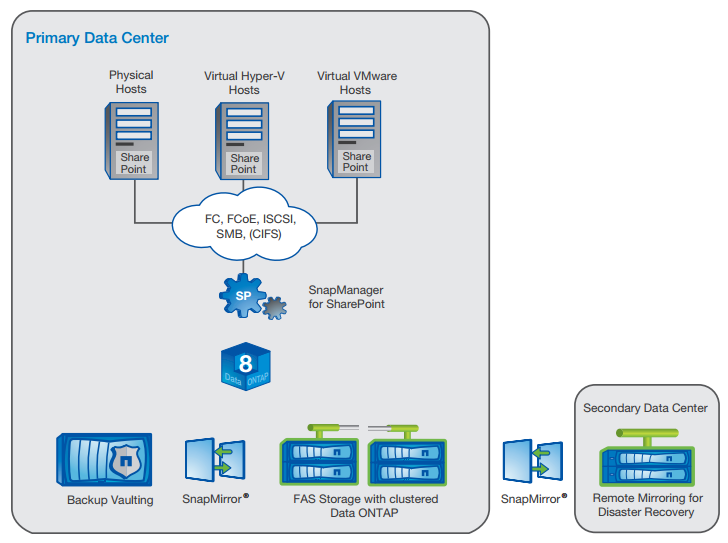
SnapManager for Microsoft SharePoint.
Partner for success
NetApp Professional Services for Microsoft Applications offers a wide range of services including SharePoint Server implementation on the NetApp storage platform disaster recovery and high availability as well as custom services to help customers with their SharePoint Server deployment. To meet your interoperability and performance needs we collaborate closely with Microsoft on key product integration efforts including performance testing product validation and joint development. In fact NetApp was recently recognized as the Microsoft Partner of the Year for server solutions. NetApp Global Support and our extensive partner network can provide expert help to assist you in planning and implementing an efficient and reliable storage and data management solution for your SharePoint Server environment.
You can find out more about the NetApp agile storage infrastructure at your local Microsoft Technology Center (MTC). There you will see firsthand how the combination of Microsoft and our hardware software and services provides a resilient foundation for even the most demanding enterprise collaboration environment. Contact your NetApp sales representative or your NetApp reseller to arrange a visit to your local MTC.
Shipping & Return
Return Policy
You need to have a Return Authorization (RA) number before returning any products to HSSL Technologies.
For a hard copy of this form and a shipping label, please include your request in the form below.
You can also request an RA online by submitting an RA Request via email. Once you have provided HSSL Technologies with the appropriate information, we will contact you with an assigned RA number.
Defective or DOA Products
DOA or defective products are returned for REPLACEMENT ONLY with the same product/model. Deviations from this policy may result in a 20% Returns Processing Service Charge.
- Defective products must be in the original factory carton with all original packing materials.
- The Return Authorization number must be on the shipping label, not the carton. Please do not write on the carton.
- Returns must be shipped freight prepaid. Products received freight collect, without an RA number, or not approved for return will be refused.
- Return Authorization numbers are valid for fourteen (14) days only. Products returned after expiration will be refused.
- HSSL credits are based on the purchase price or current price, whichever is lower.
General Return Terms
You may return most new, unopened items within 30 days of delivery for a full refund. We will also pay return shipping costs if the return is a result of our error (e.g., you received an incorrect or defective item).
You should expect to receive your refund within approximately six weeks of giving your package to the return shipper. This period includes:
- 5–10 business days for us to receive your return from the shipper
- 3–5 business days for us to process your return
- 5–10 business days for your bank to process the refund
If you need to return an item, please Contact Us with your order number and product details. We will respond quickly with instructions for returning items from your order.
Shipping Policy
We can ship to virtually any address in the world. Note that there are restrictions on some products, and certain products cannot be shipped to international destinations.
When you place an order, we will estimate shipping and delivery dates based on the availability of your items and the shipping options you select. Depending on the provider, estimated shipping dates may appear on the shipping quotes page.
Please also note that shipping rates for many items are weight-based. The weight of each item can be found on its product detail page. To reflect the policies of the shipping companies we use, all weights will be rounded up to the next full pound.
Has my order shipped?
Click the "My Account" link at the top right hand side of our site to check your orders status.
How do I change quantities or cancel an item in my order?
Click the "My Account" link at the top right hand side of our site to view orders you have placed. Then click the "Change quantities / cancel orders" link to find and edit your order. Please note that once an order has begun processing or has shipped, the order is no longer editable.
How do I track my order?
Click the "My Account" link at the top right hand side of our site to track your order.
My order never arrived.
Click the "My Account" link at the top right hand side of our site to track your order status. Be sure that all of the items in your order have shipped already. If you order displays your Package Tracking Numbers, check with the shipper to confirm that your packages were delivered. If your packages each show a status of "delivered", please contact customer service for assistance.
An item is missing from my shipment.
Click the "My Account" link at the top right hand side of our site to track your order status. Be sure that all of the items in your order have shipped already. If you order displays your Package Tracking Numbers, check with the shipper to confirm that your packages were delivered. If your packages each show a status of "delivered", please contact customer service for assistance.
My product is missing parts.
Click the "My Account" link at the top right hand side of our site to track your order status. Be sure that all of the items in your order have shipped already. If you order displays your Package Tracking Numbers, check with the shipper to confirm that your packages were delivered. If your packages each show a status of "delivered", please contact customer service for assistance.
When will my backorder arrive?
Backordered items are those which our suppliers are unable to predict when they will have more in stock, but as soon as they do, we will be able to ship the item to you.
Warranty
Why Choose HSSL?
We connect businesses with the right technology solutions to power growth, security, and efficiency.

Expertise
Backed by years of industry knowledge, our specialists understand the challenges modern businesses face.

Partnerships
We collaborate with top-tier technology providers to bring you innovative & high-performance products.

End-to-End Support
Our dedicated support ensures your systems stay optimized, secure, and ready for what’s next.

Scalable Solutions
Our adaptive approach ensures your IT infrastructure evolves seamlessly as your business expands.
Expert in IT & Security Solutions
At HSSL, we specialize in delivering cutting-edge IT infrastructure, cloud, and cybersecurity services that empower businesses to thrive in a digital-first world. Our trusted professionals provide reliable insights on:
-
Digital Transformation Strategy
Empowering businesses to adapt and grow through modern, secure, and scalable digital infrastructure.
-
Advanced Cybersecurity
Protecting your organization from digital threats with proactive monitoring and smart security frameworks.
-
Cloud & Infrastructure Management
Optimizing cloud performance and IT operations for seamless scalability and improved business agility.
-
Data Backup & Recovery
Ensuring business continuity through secure data management, automated backups, and rapid recovery solutions.
-
Network & Endpoint Solutions
Delivering secure, high-performance networking systems that keep your business connected and efficient.
-
Technology Consulting
Guiding organizations toward smarter IT investments and solutions that align with their long-term goals.
You May Also Like
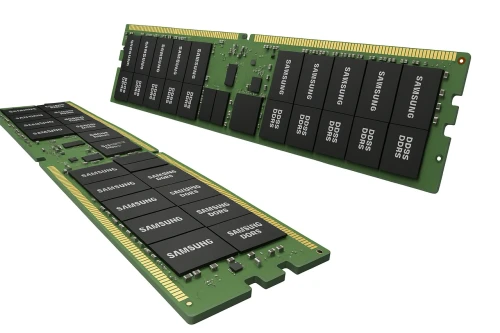
Samsung 96GB DDR5-6400 ECC Registered RDIMM Server Memory - M321RYGA0PB2-CWM


Apple USB-C Digital AV Multiport Adapter for Mac/iPad/iPhone - MW5M3AM/A

Apple AppleCare+ - extended service agreement - 3 years - carry-in - SD263LL/A


Apple AppleCare+ - extended service agreement - 3 years - carry-in - SD273LL/A

Apple AppleCare for Enterprise Studio Display XDR 36 Months - Tier 3 - SP+ - SENW3LL/A

Apple AppleCare for Enterprise Apple Studio Display 36 Months - Tier 3 - SP+ - SEUQ2LL/A

Apple AppleCare for Enterprise Studio Display XDR 36 Months - Tier 1 - SP - SEMR3LL/A

Apple AppleCare for Enterprise Studio Display XDR 48 Months - Tier 2 - SP - SEN13LL/A

Apple AppleCare for Enterprise Studio Display XDR 48 Months - Tier 3 - SP+ - SENK3LL/A

Apple AppleCare for Enterprise Studio Display XDR 48 Months - Tier 1 - SP - SEMY3LL/A

Apple AppleCare for Enterprise Studio Display XDR 48 Months - Tier 2 - SP+ - SENH3LL/A

Apple AppleCare for Enterprise Studio Display XDR 36 Months - Tier 3 - SP - SEMW3LL/A

Apple AppleCare for Enterprise Apple Studio Display 36 Months - Tier 1 - SP+ - SEUN2LL/A

Apple AppleCare for Enterprise Studio Display XDR 36 Months - Tier 1 - SP+ - SEN63LL/A

Apple AppleCare for Enterprise Studio Display XDR 36 Months - Tier 2 - SP - SEMU3LL/A

Apple AppleCare for Enterprise Apple Studio Display 36 Months - Tier 2 - SP+ - SEUP2LL/A

Apple AppleCare for Enterprise Studio Display XDR 36 Months - Tier 2 - SP+ - SENF3LL/A

Apple AppleCare for Enterprise Apple Studio Display 48 Months - Tier 1 - SP - SF1P2LL/A

Apple AppleCare for Enterprise Apple Studio Display 48 Months - Tier 2 - SP+ - SF1Y2LL/A

Apple AppleCare for Enterprise Apple Studio Display 48 Months - Tier 3 - SP - SF242LL/A